PHP2Shell: Critical PHP RCE Flaws and the Fix
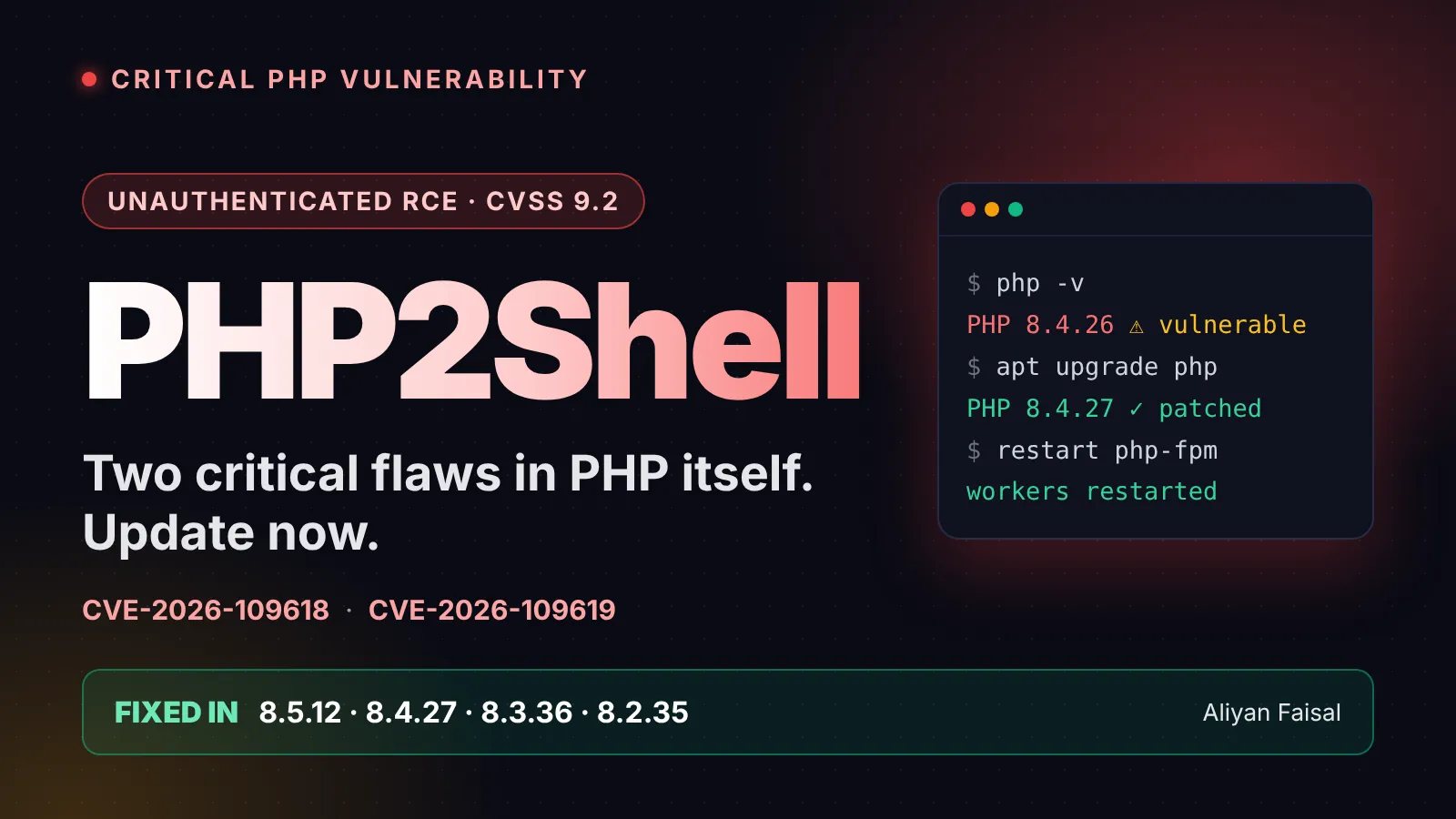
PHP2Shell is the name researchers gave to two critical flaws in PHP itself, tracked as CVE-2026-109618 and CVE-2026-109619. Both carry a CVSS v4 score of 9.2, both can lead to unauthenticated remote code execution, and both were patched on 21 October 2026 in PHP 8.5.12, 8.4.27, 8.3.36 and 8.2.35. The part that makes this different from the usual CMS plugin bug: the hole is in the PHP engine, so a site can be perfectly written and still be exposed.
I'm writing this the day after the patches landed because most of the coverage is aimed at security teams. Here it's split in two: what developers need to do on the server, and what a site owner can do without touching a terminal.
What PHP2Shell actually is
Two separate bugs, one shared theme: PHP gets interrupted mid-request and then trusts memory that is no longer valid.
CVE-2026-109618 is an out-of-memory handling bug. PHP uses longjmp() to bail out when a memory allocation fails. If that happens while request data is only half set up, the cleanup at the end of the request can read or branch on invalid state. A crafted multipart request, the kind used for forms and file uploads, can push memory use past what the configured limits suggest. The official advisory says this can lead to unauthenticated RCE as the web worker account.
CVE-2026-109619 is a stale-state bug. Internal state left behind by one request can still point at freed memory when a later request lands on the same worker. Fatal errors, including memory exhaustion and execution timeouts, can interrupt cleanup and make it worse. The confirmed paths run through the session upload progress feature, which is enabled by default and doesn't need your code to call session_start(), and on PHP 8.5 through the fatal error backtrace feature.
| CVE-2026-109618 | CVE-2026-109619 | |
|---|---|---|
| Bug class | Memory corruption during out-of-memory handling | Use-after-free of stale state across requests |
| Trigger | Crafted multipart requests that exhaust memory | A fatal error, then a later request on the same worker |
| CVSS v4 | 9.2 (Critical) | 9.2 (Critical) |
| Authentication | None | None |
Beyond code execution, researchers also reported that attackers could read PHP worker memory, which can expose passwords, tokens, API keys and certificates.
Who is affected
If you run PHP, assume you are until you've checked. Google Cloud's advisory lists every version from 5.4 through 8.5.11 as vulnerable. Fixed releases exist only for the four supported branches:
| PHP branch | Vulnerable below | Fixed in |
|---|---|---|
| 8.5 | 8.5.12 | 8.5.12 |
| 8.4 | 8.4.27 | 8.4.27 |
| 8.3 | 8.3.36 | 8.3.36 |
| 8.2 | 8.2.35 | 8.2.35 |
PHP 8.1 and older no longer get routine updates from the PHP project, so there is no clean upgrade path inside those branches. Limited source backports exist for 7.4, 8.0 and 8.1, and some Linux distributions and long-term support vendors ship their own fixes. PHP 8.2 itself reaches end of life on 31 December 2026, which makes this a good moment to plan the jump to 8.4 or 8.5.
The affected server interfaces are PHP-FPM, Apache mod_php, php-cgi, FrankenPHP and LiteSpeed. The advisory ranks mod_php as the highest risk because cleanup runs even when request startup fails, so exploitation can happen before your application code runs at all. PHP-FPM is harder to exploit for the out-of-memory bug, but code execution on FPM was demonstrated for the second CVE.
Is it being exploited?
Attempts, yes. Confirmed break-ins, not that I've seen. watchTowr reported active exploitation attempts on 21 October, and Cloudflare said it saw early attacks and shipped WAF rules by default. Rapid7 says the public proof-of-concept exploits it checked only work for specific combinations of operating system, PHP version and web server, and none looked broadly reliable. It also expects that to change and says a more portable technique could appear at any time.
My read: don't treat "the public exploits are flaky" as a reason to wait. The window between a flaky proof of concept and a reliable one is usually short, and you can't know ahead of time which of your servers matches the lucky combination.
How developers fix it
Step 1: find every PHP install. That means the web servers, but also containers, CI images and anything that bundles its own PHP.
php -v
php-fpm -v           # or php-fpm8.4 -v on Debian/Ubuntu
apachectl -M | grep php   # mod_php shows up here
docker run --rm your-image php -v
Step 2: upgrade to the fixed version for your branch. If you install from your distribution's repository, the package version may look older than the upstream number because vendors backport fixes. Check the package changelog for the two CVE IDs instead of trusting the version string.
# Debian/Ubuntu: look for the CVE IDs in the changelog
apt changelog php8.4-fpm | grep -E "CVE-2026-10961[89]"
Step 3: rebuild your images. A patched host does nothing for a container that still carries the old PHP. Rebuild from a patched base image and redeploy every service that runs it.
Step 4: restart all workers. A package upgrade alone doesn't help until PHP-FPM or Apache is restarted, and the same goes for any configuration change below.
Step 5: stop relying on end-of-life branches. If you're on 8.1 or older, upgrade to a supported branch, or get a vendor-backported fix. Don't assume the old branch is safe just because nobody has published an exploit for it.
If you can't patch today
The advisory is clear that only updating is a complete fix, so treat these as a stopgap and not a plan. All of them must be set at a level your application can't override: php.ini, the FPM pool or the web server config, not ini_set() or .user.ini.
; reduces the out-of-memory path (CVE-2026-109618)
memory_limit = -1
post_max_size = 8M

; closes the confirmed session paths (CVE-2026-109619)
session.upload_progress.enabled = 0

; PHP 8.5 only
fatal_error_backtraces = 0
A few caveats that matter. Disabling session upload progress does nothing for the first CVE, and memory_limit=-1 only reduces the risk, it doesn't remove it. I'd also be wary of leaving memory_limit=-1 on for long, because a runaway script can now eat all the RAM on the box. Keep request size limits tight at the web server or proxy, block multipart requests entirely if your app doesn't use them, and don't use RLIMIT_AS or RLIMIT_DATA to cap memory, since PHP warns those can trigger the vulnerable path. Hiding errors with display_errors or @ doesn't help either.
After you patch
The fix removes longjmp() for out-of-memory handling and adds a new hard memory limit that ends the process when it's reached. One side effect: shutdown handlers won't run in that case. Review memory_limit and post_max_size against what your app really needs, especially if you set them aggressively as a workaround.
How site owners stay safe
You don't need to read a CVE to protect a website. This is the owner's checklist:
- Ask your host in writing whether the servers are patched against CVE-2026-109618 and CVE-2026-109619. Shared hosting, managed WordPress and cloud platforms update PHP at different speeds, and Google Cloud's guidance shows some platforms patch automatically while others need you to redeploy.
- Check your PHP version in your hosting control panel or the site health screen of your CMS, and switch to the newest supported version your site works with. Test on a staging copy first if you can.
- Update the CMS, plugins and themes at the same time. They're a separate attack surface, and a plugin that's incompatible with a new PHP version will show up in staging, not production.
- Put a firewall in front of the site. A WAF such as Cloudflare or your host's equivalent can block some attack traffic, but it's not a substitute for patching.
- Rotate secrets if you suspect exposure. Because the flaws can disclose worker memory, change API keys, database passwords and tokens for any server that was exposed and unpatched.
- Back up before and after. A clean offline backup is what saves you if something does get in.
Signs a server may have been hit
Researchers point to a few warning signs: unusual multipart requests followed by memory-limit errors or repeated HTTP 500 responses, unusually large PHPSESSID cookies in responses, and unexplained PHP worker restarts. Look back to at least 20 October, since exploitation may have started before the patches shipped. Exploitation happens below the application layer, so your app logs may show very little, and a clean log doesn't prove a clean server. If you find anything suspicious, treat the server as compromised and rotate credentials.
Frequently Asked Questions
My site runs WordPress, not custom PHP. Am I affected? Yes, if the server's PHP version is vulnerable. The flaws are in the PHP engine, so the application on top doesn't change the exposure. Recorded Future's write-up says Wiz demonstrated unauthenticated RCE against WordPress, Drupal and Joomla.
I'm on PHP 8.1 and my host says there's no update. What now? Move to a supported branch, or ask the host for a vendor backport. PHP released limited source backports for 8.1, 8.0 and 7.4, but they aren't a long-term answer.
Does PHP-FPM protect me better than mod_php? Somewhat for the out-of-memory bug, since FPM stops the worker when request startup fails. It isn't immunity: code execution on FPM was demonstrated for CVE-2026-109619.
Can I just disable file uploads? It reduces one trigger, not both. Session upload progress is on by default and doesn't depend on your upload forms, so apply the config changes above and still patch.
Key Takeaway
Patch PHP to 8.5.12, 8.4.27, 8.3.36 or 8.2.35 (or a vendor build that carries both fixes), rebuild your containers, restart every worker, and rotate secrets on anything that was exposed. If you can't update this week, apply the temporary settings at the server level and plan a real upgrade, because those settings are a bridge and not a fix.
Last checked 22 October 2026. Details are still moving, so confirm against the official advisories before you rely on them: CVE-2026-109618, CVE-2026-109619 and the PHP announcement. Further reading: Rapid7, Google Cloud, Recorded Future and The Hacker News.

Related posts

Fix Laravel 419 CSRF Token Mismatch Error
A real fix for the Laravel 419 CSRF token mismatch error — session cookie settings, SPA/Axios setup, and when to actually use the except array.
PHP-FPM: Dynamic vs OnDemand vs Static
PHP-FPM's pm mode decides how much RAM your server burns at idle. Here's dynamic vs ondemand vs static compared, with the numbers that matter.

Fix "Too Many Open Files" on Linux
Server crashing with EMFILE or "too many open files"? Here's what causes it and how to fix ulimit, limits.conf, and systemd LimitNOFILE for good.
Shopify Webhook HMAC Verification Fix
Fix Shopify webhook HMAC verification failures in Node.js and Laravel by capturing the raw request body before parsing and comparing it correctly.
0 Comments
No comments yet — be the first to share your thoughts.