Fix CORS Errors in React and Node.js Apps
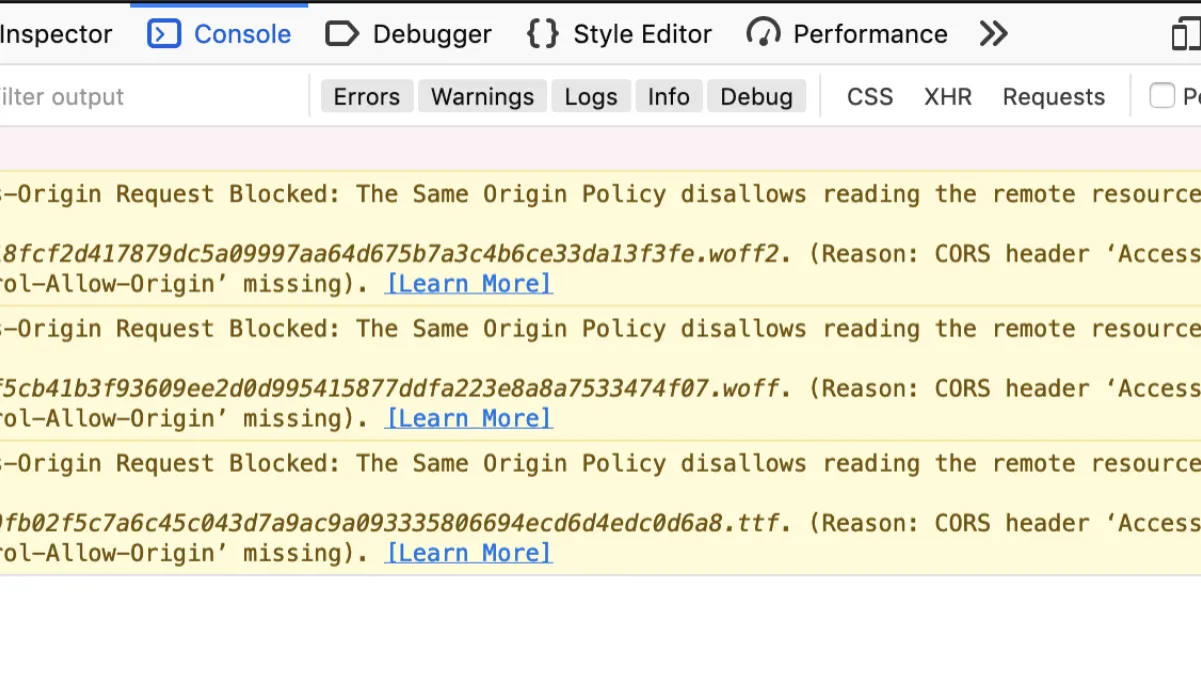
A CORS error on your React app almost always traces back to one of three things on the Node.js side, and it's rarely the fix most Stack Overflow answers reach for first. You'll see something like "Access to fetch at 'http://localhost:5000/api/users' from origin 'http://localhost:3000' has been blocked by CORS policy" in the console, the request shows up red in the Network tab, and the instinct is to just slap app.use(cors()) at the top of your Express app and move on. That makes the error go away locally, then comes back the moment you deploy, because local and production almost never share the same origin setup.
I ran into this exact version last month on a client project: a React app on Vercel talking to an Express API on Railway. Worked perfectly on localhost, broke the second it hit staging. The fix wasn't "add more CORS," it was understanding which of the three failure modes was actually happening.
Why the browser blocks the request in the first place
CORS (Cross-Origin Resource Sharing) isn't a bug in your API — it's the browser enforcing the same-origin policy on your behalf. Your Node.js server will happily respond to a request from anywhere; the browser is the one refusing to hand that response to your React code unless the server's response headers explicitly say it's allowed. That's the detail that trips people up: the request often does reach your server and does get processed. You can see it complete in your server logs while the browser still shows a CORS error, because the block happens on the response side, not the request side.
Three origins have to line up for the simplest case:
- The scheme (
httpvshttps) - The hostname (
localhostvs127.0.0.1vsmyapp.com) - The port (
3000vs5000vs none)
Change any one of those between your frontend and backend and you've got a cross-origin request, full stop — even localhost:3000 talking to localhost:5000 counts.
The actual fix: explicit origins, not a wildcard
Most tutorials tell you to reach for app.use(cors()) with no arguments and call it done. I'd skip that past local development — it sets Access-Control-Allow-Origin: *, which silently breaks the moment you need to send cookies or an Authorization header with credentials: true, because the spec explicitly forbids combining a wildcard origin with credentialed requests. You'll trade today's error for a more confusing one in a few weeks.
Here's the version I actually ship:
const cors = require('cors');

const allowedOrigins = [
  'http://localhost:3000',
  'https://myapp.com',
  'https://staging.myapp.com',
];

const corsOptions = {
  origin: function (origin, callback) {
    // allow requests with no origin (curl, mobile apps, server-to-server)
    if (!origin || allowedOrigins.includes(origin)) {
      callback(null, true);
    } else {
      callback(new Error(`Origin ${origin} not allowed by CORS`));
    }
  },
  credentials: true,
  methods: ['GET', 'POST', 'PUT', 'PATCH', 'DELETE', 'OPTIONS'],
  allowedHeaders: ['Content-Type', 'Authorization'],
};

app.use(cors(corsOptions));

// Express 4.16+: handle preflight OPTIONS requests explicitly
app.options('*', cors(corsOptions));
That app.options('*', cors(corsOptions)) line is the part people skip and then wonder why PUT and DELETE requests still fail while GET works fine. Any request that isn't a "simple" request — which in practice means anything sending JSON, a custom header, or using PUT/PATCH/DELETE — triggers a preflight OPTIONS request first. If your server doesn't answer that preflight with the right headers, the browser never even sends the real request, and you'll see the failure on the OPTIONS call in the Network tab, not the one you expected.
Fixing it on the React side
The frontend fix is usually smaller than people expect — you're not working around CORS in React, you're just making sure you're not accidentally fighting your own backend config. If you're sending cookies for session auth, fetch needs credentials: 'include' to match the server's credentials: true:
fetch('https://api.myapp.com/users', {
  method: 'GET',
  credentials: 'include',
  headers: { 'Content-Type': 'application/json' },
});
With axios, that's axios.defaults.withCredentials = true set once globally, not per-request. Forgetting this is the single most common reason a CORS fix "works" for public endpoints and then breaks specifically on the authenticated ones.
Where this actually breaks in production (and local dev hides it)
Local dev is forgiving in ways that bite you later. A few things I check in roughly this order when a client says "it works on my machine":
- Reverse proxies rewriting the origin. If Nginx or a load balancer sits in front of your API, it can strip or rewrite the
Originheader before it reaches Express, which means yourallowedOriginscheck is comparing against something that never arrives. Log the incomingreq.headers.originon the server to confirm what's actually showing up. - Environment-specific origins hardcoded once.
http://localhost:3000inallowedOriginsworks great until staging and production need their own entries too — easy to forget staging entirely. - A CDN or edge cache serving a stale
OPTIONSresponse. Preflight responses can get cached longer than you'd expect viaAccess-Control-Max-Age; if you change your allowed origins and the error persists, check whether the browser or a CDN is still serving the old preflight. - Multiple CORS middlewares stacking. I've seen
cors()applied globally and again inside a specific router, which can produce duplicateAccess-Control-Allow-Originheaders — technically invalid, and some browsers reject the response outright rather than picking one.
Frequently Asked Questions
Why does my CORS error only show up when I add an Authorization header, not before?
Adding a custom header turns a "simple" GET request into one that requires a preflight OPTIONS check first. If your server isn't explicitly handling OPTIONS or doesn't include that header in allowedHeaders, the preflight fails silently and the real request never fires.
Can I just use Access-Control-Allow-Origin: * and move on?
Only if you never need cookies or credentials, and honestly even then I'd rather set an explicit list — a wildcard makes it harder to reason about who can actually call your API, and you'll likely need credentials eventually anyway.
I fixed the backend but I'm still getting the CORS error — what am I missing?
Hard-refresh and check the Network tab for the actual OPTIONS preflight response, not just the failed request. If the preflight itself is failing or returning stale headers, the browser never retries the real request with new settings until that's fixed.
Does this apply the same way to Next.js API routes or just Express?
Same underlying browser behavior, different syntax for setting the headers. Next.js API routes (and route handlers in the app directory) need the same Access-Control-Allow-Origin/Access-Control-Allow-Credentials headers set manually or via middleware — the browser doesn't care what framework generated the response.
Conclusion
CORS errors feel like a frontend problem because that's where you see them, but the fix almost always lives on the server: an explicit origin allowlist, a handled preflight, and credentials matched on both sides. Skip the wildcard once cookies or auth headers are involved, and when a fix "works locally but not in staging," check the actual Origin header your server is receiving before you touch any more CORS config — that's usually where the real mismatch is hiding.

Related posts

Fix CORS Errors in React + Node.js Apps
Learn why the 'No Access-Control-Allow-Origin' CORS error happens in React + Node.js apps, and the exact Express fix that solves it for good.

How to Upload Files in React and Node.js
A step-by-step guide to handling file uploads in a full-stack app: multipart form data in React, Multer on the Node.js API, and the mistakes that break it.

JWT Authentication in Full-Stack Apps
Learn JWT authentication for full-stack apps: short-lived access tokens, refresh token rotation, secure client storage, and true token revocation.

Fix Laravel 419 CSRF Token Mismatch Error
A real fix for the Laravel 419 CSRF token mismatch error — session cookie settings, SPA/Axios setup, and when to actually use the except array.
0 Comments
No comments yet — be the first to share your thoughts.